How do I enroll and use Portal Groups?
MyTCC Portal has a feature that allows clubs, affiliations
and other groups of people to virtually meet in a common place on the Portal.
Portal Groups are accessible under the "My Groups" tab of the Portal. The first
time you visit the "My Groups" tab you see the "Offering Subscription" Channel
as you see below.
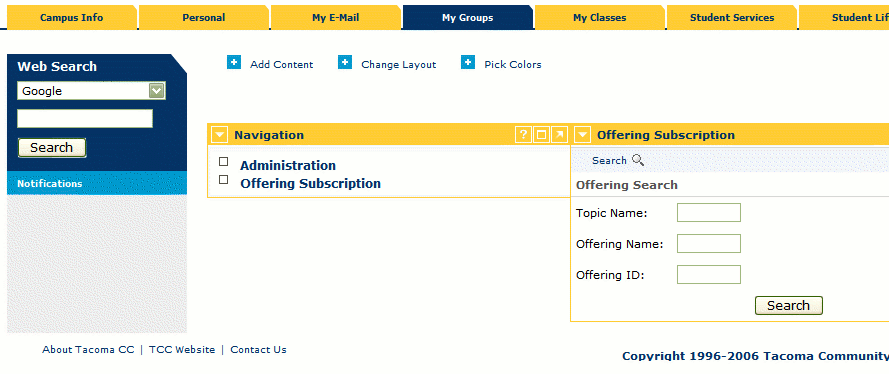
Use the Offering Subscription Channel to search for Groups which
you can enroll in.
With the Offering Subscription Channel you can search for Groups by name in
which to enroll in. You can also just click the "Search" button to see a list of
all groups that are available.
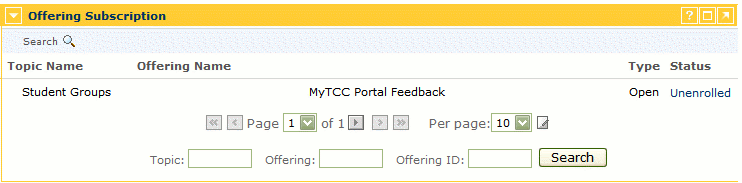
A list of Offerings (Groups) which are available. If you click on
"Unenrolled" you will be enrolled in the group.
Once you see the list of Offerings (or Groups) that are
available you may click the link under Status that says "Unenrolled". Clicking
on this link will change the link to "Enrolled" and enroll you in the Group. Now
that you have enrolled in at least one group a third link will appear in the
"Navigation" channel called "My Subscriptions". Under "My Subscriptions" you
should see listed all the groups you are enrolled in. Click one of these groups
to get started.
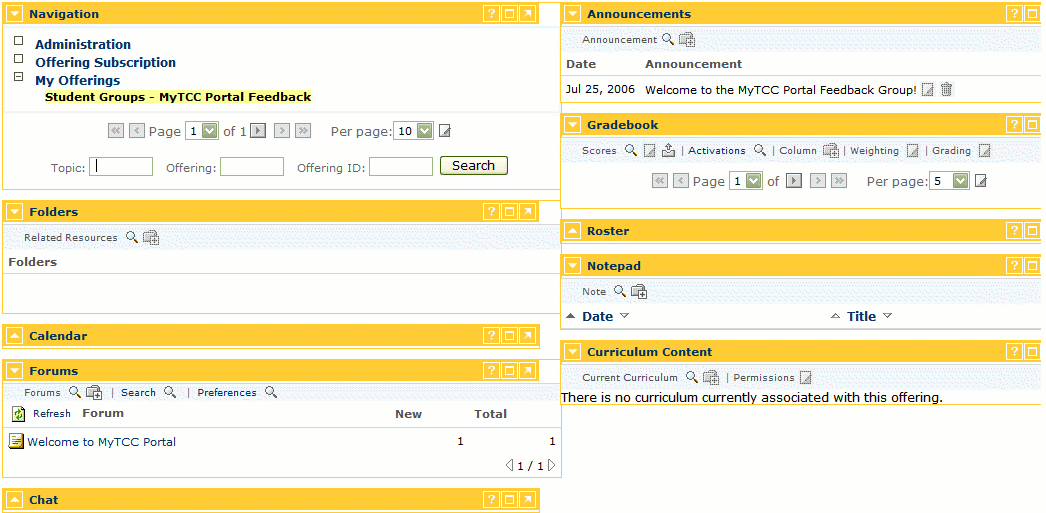
All the resources available in an offering: Forums,
Announcements, Folders, Notepad and Chat.
Once you have selected a group from the "My Offerings"
list you will see a list of resources that are available for you to view. These
resources include Announcements, Forums, Calendar, Notepad and Folders. A common
resource that is used in groups is the Forums. To use the Forums first click the
link that says "Show Forum Topics" in the Forums Channel. This will list all the
Forums available in the group. Click on one of the Forum topics to see the
Messages inside. When viewing a Message you may click "Post Reply" to reply to a
message. Alternatively you can click the
 button at the top when viewing a
Forum to add a new Message to a Forum.
button at the top when viewing a
Forum to add a new Message to a Forum.